Do not over-focus on calorie estimates. Heart-rate zones, workout state, and steady duration are easier signals to act on.
See progress in every 1000swim.
1000swim is a swim analysis app for Apple Watch swimming, swim progress tracking, and 1000m swim comparison. Pace, heart rate, stroke rate, distance per stroke (DPS), and long-term distance are reorganized so you can see where you became steadier, faster, and more efficient.
If you already swim with Apple Watch and want more than a workout log, 1000swim helps you compare swims, track 1000m progress, and make sense of changes in pace, heart rate, and distance per stroke.
What it helps with
Progress is not always obvious day to day. Put pace, heart rate, and DPS on a timeline, and the stages start to show.
Put this year's 1000 m next to last year's. A 5-minute gap stops being abstract when it becomes distance in the same pool.
Progress is not a straight line.
Stroke changes raise the load. The body adapts. The swim gets steadier. Then the next breakthrough starts another cycle.
How to use it
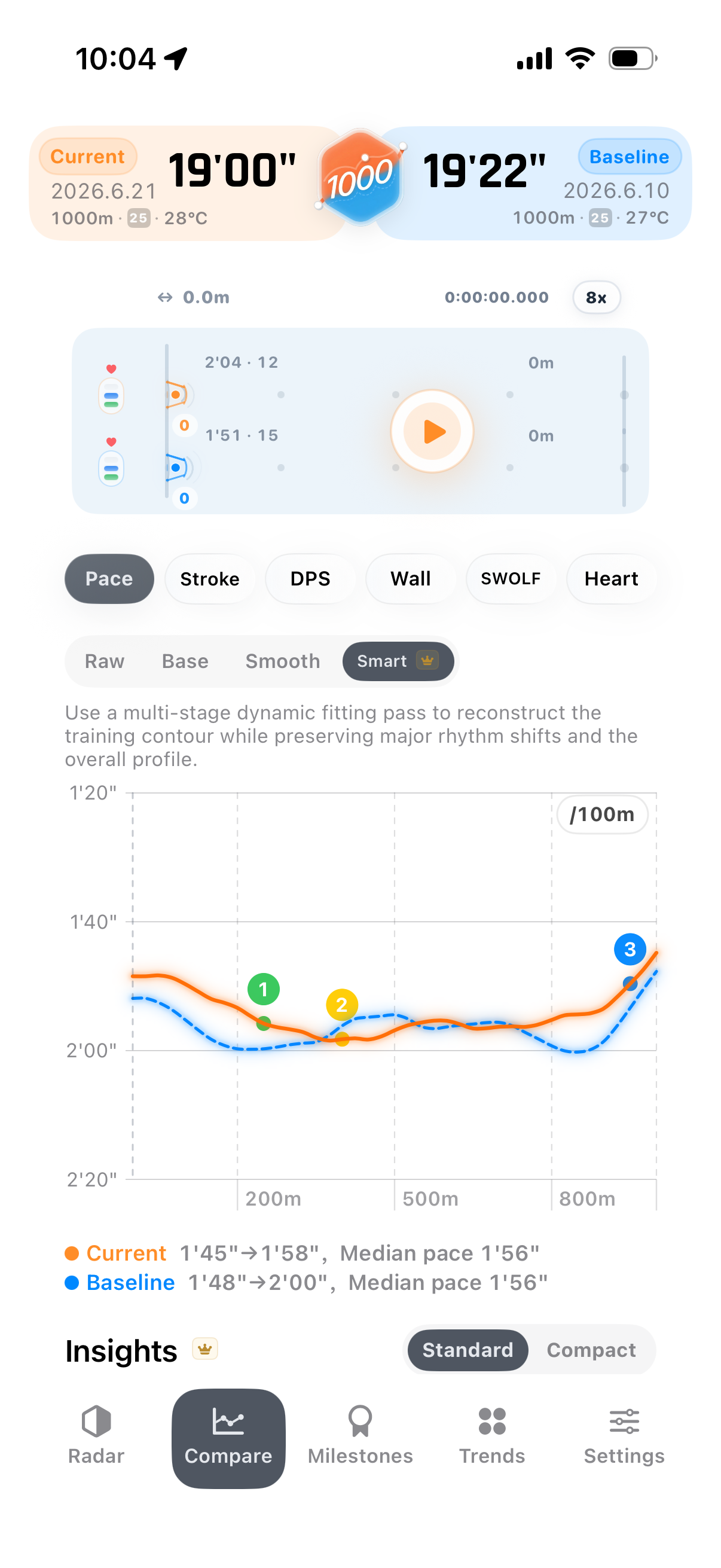
Find where you actually improved
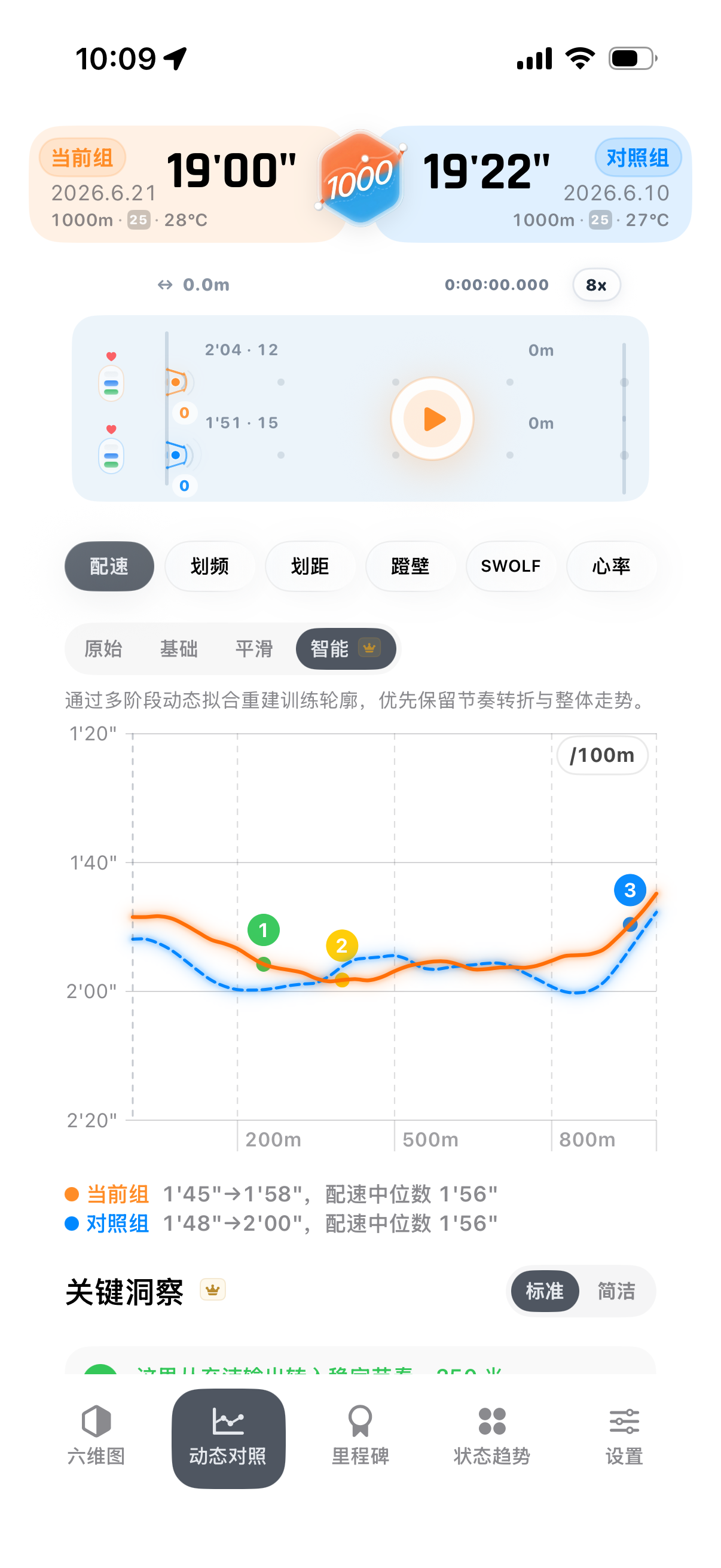
Open Dynamic Compare and select two similar-distance swims. It puts pace, distance gap, and same-pool position together instead of only showing a finish-time difference.
- Where to tap: Open a swim, choose Dynamic Compare, then pick a past swim.
- What to read: Use same-pool simulation for distance gap, and line charts for where the pace separated.
- What it solves: Turns "I got faster" into "this is where I got stronger".
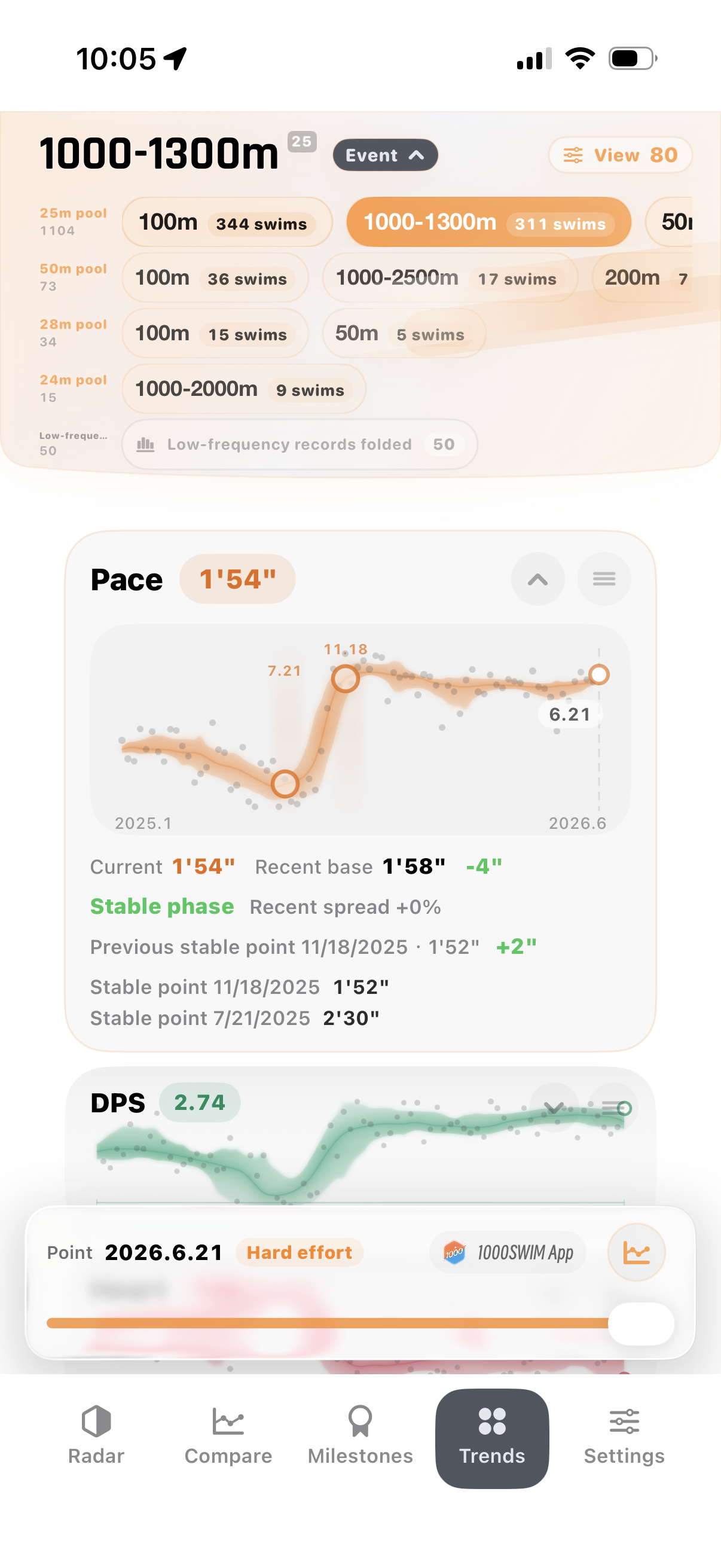
See long-term training stages
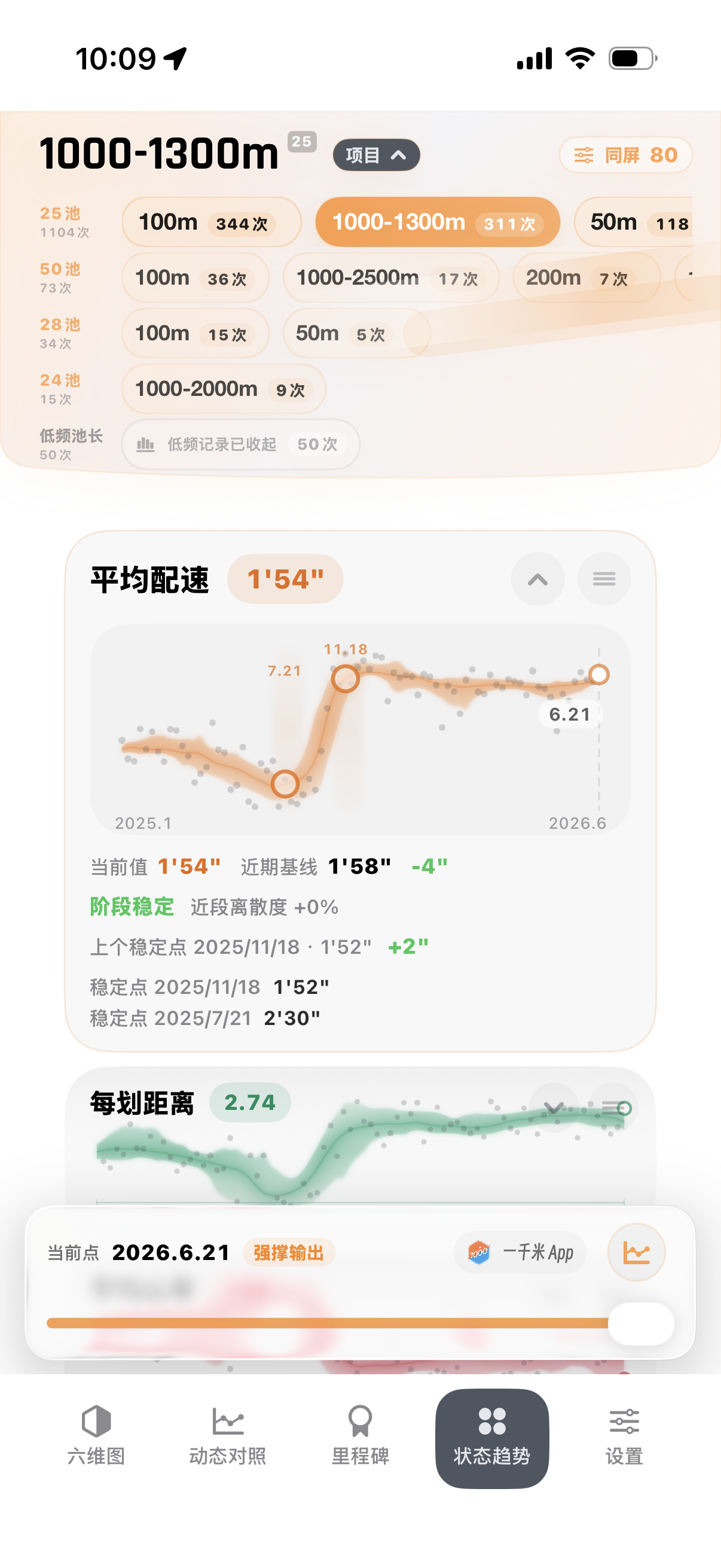
Open Status Trends and put pace, heart rate, and DPS on a timeline. Stroke changes, adaptation, plateaus, and breakthroughs become easier to spot.
- Where to tap: Open the detail page and switch to Status Trends.
- What to read: Look for steadier pace, lower heart rate, or rising DPS.
- What it solves: Shows that progress may be happening in stages, not every single day.
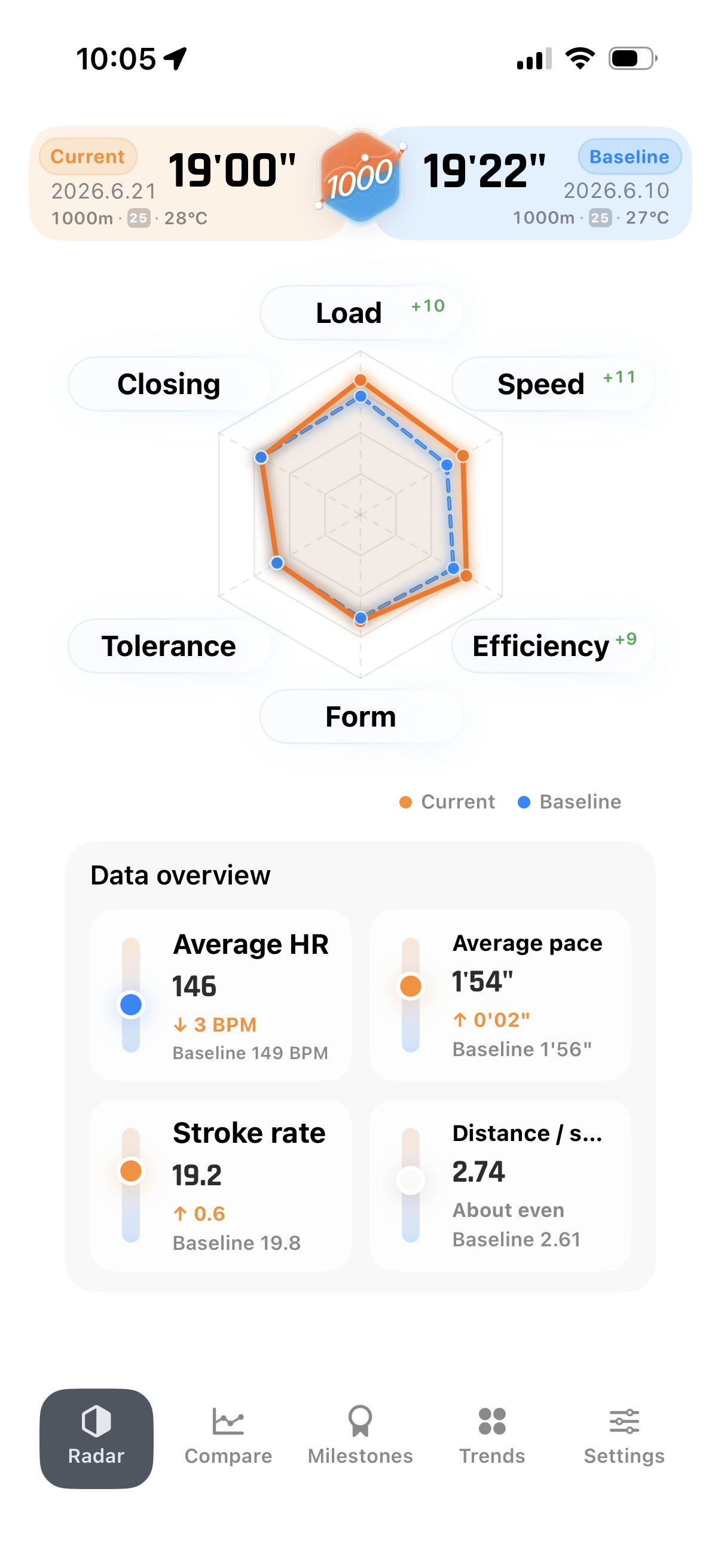
Understand what was strong in this swim
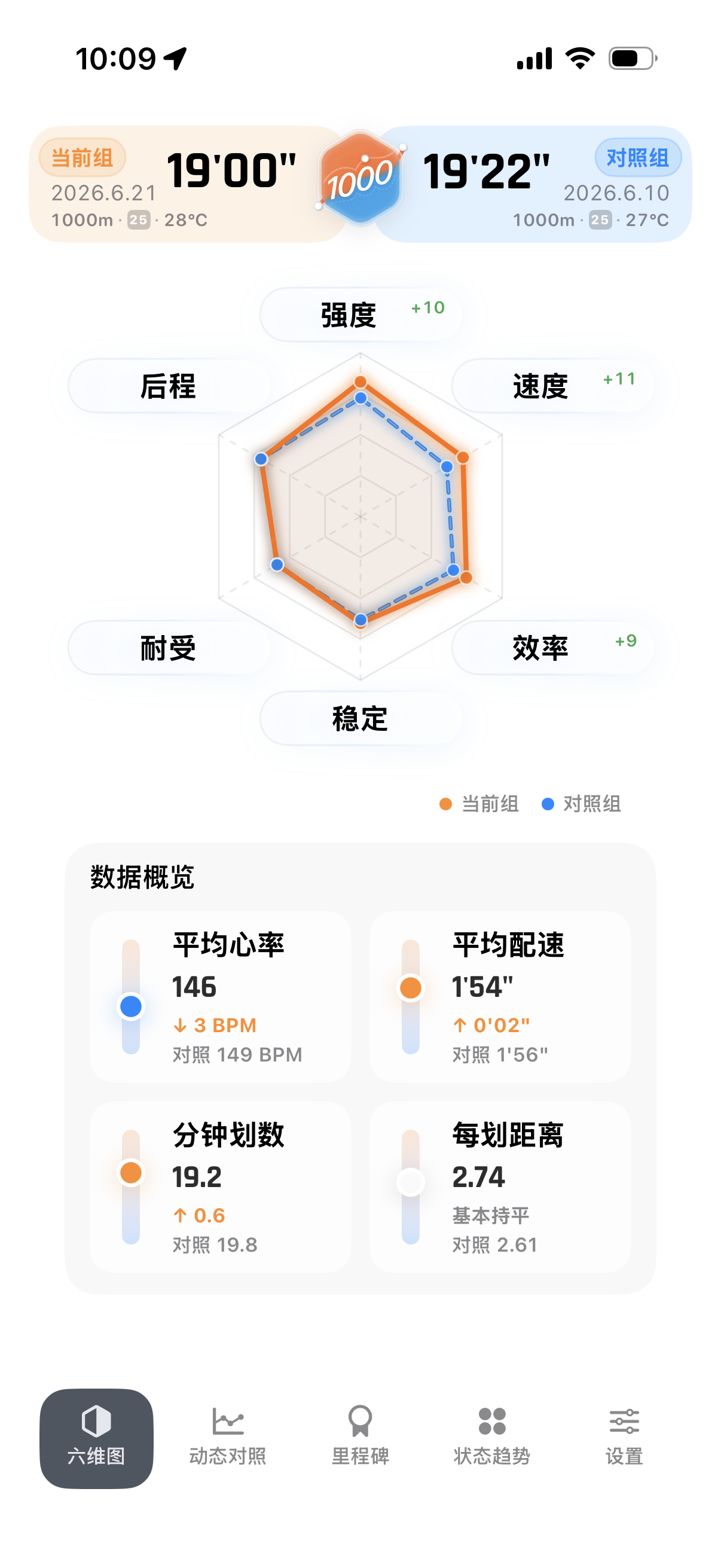
Use Radar and KiloCard. Radar summarizes speed, efficiency, load, and stroke behavior in one view. KiloCard turns one swim into a shareable comparison reference.
- Where to tap: Switch to Radar, then create a KiloCard from the swim.
- What to read: See whether speed came from better efficiency, not just harder effort.
- What it solves: Gives one workout both structure and share value.
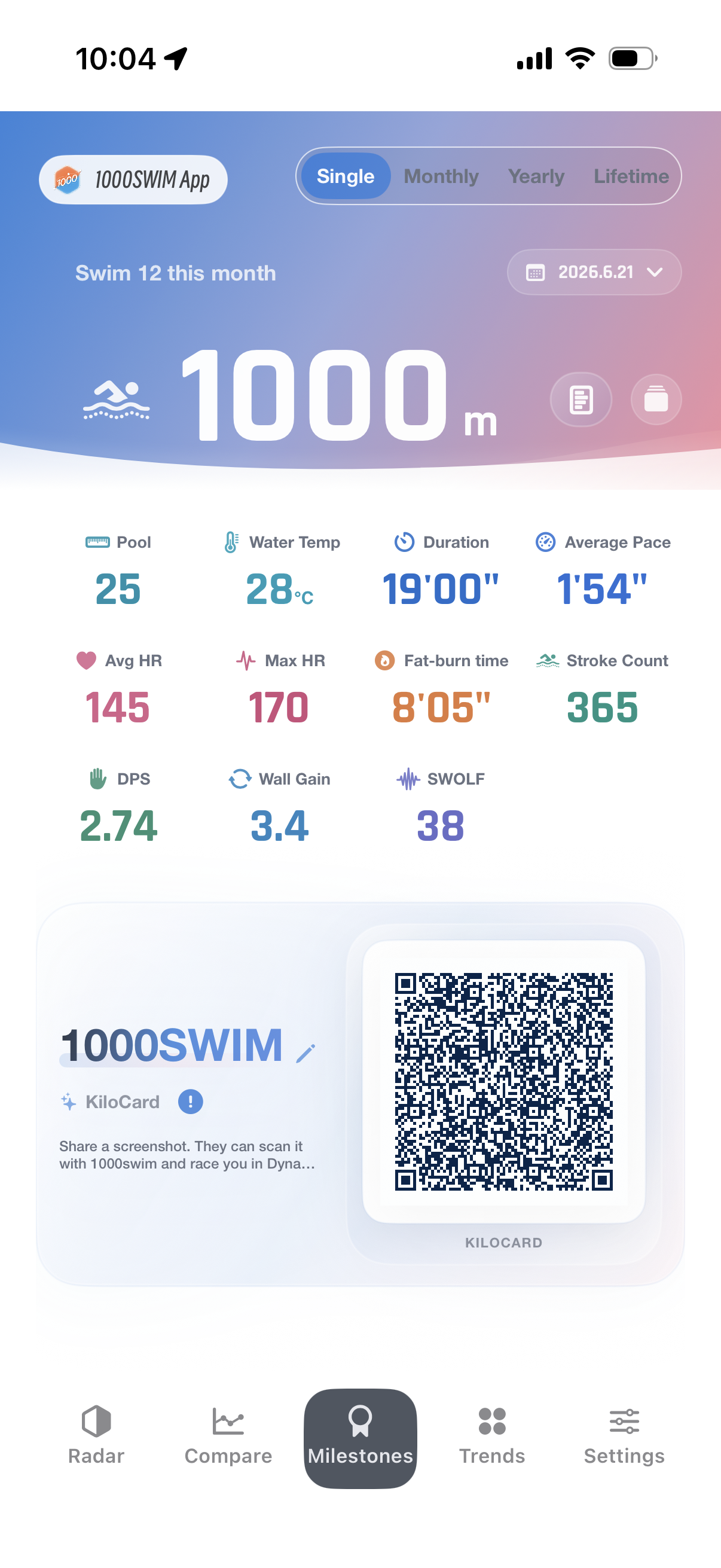
Make consistency feel rewarding
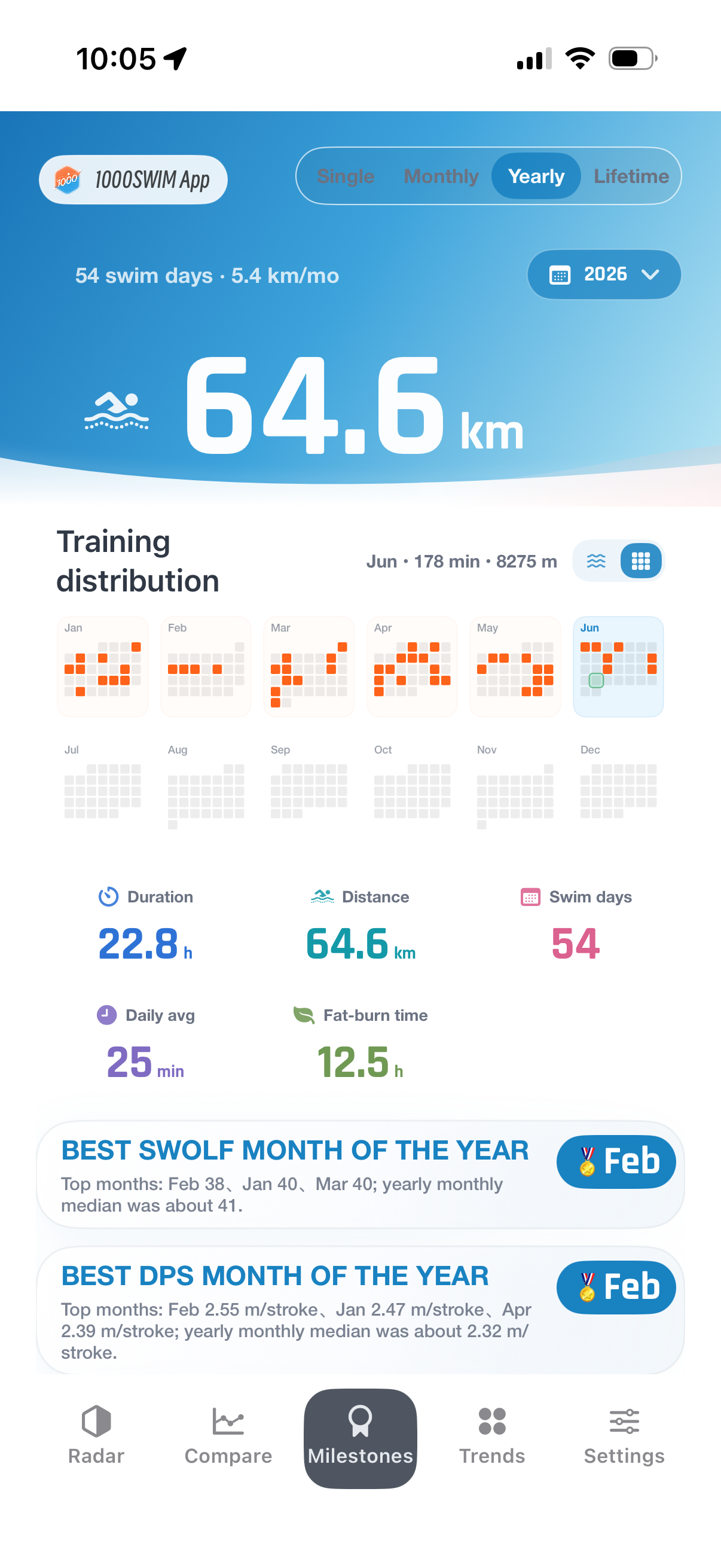
Use Milestones. A daily 1000 m swim may feel ordinary, but monthly, yearly, and lifetime views turn repetition into visible accumulation.
- Where to tap: Open Milestones and review monthly, yearly, and lifetime progress.
- What to read: Check yearly distance, stable months, and the next progress point.
- What it solves: Makes routine training feel like it is building toward something.
Common questions
1000swim is not just for logging swims. It helps you understand why a 1000 m swim changed, where the gap came from, and what your Apple Watch records are actually saying.
Explaining one swim
Why did this swim become faster or slower?
Short answer: 1000swim is built to explain a swim, not only record it. The key question is why a 1000 m swim became faster, slower, steadier, or more demanding.
Good fit if: Regular swimmers who want more than a finish time.
- What it checks: Pace, heart rate, stroke rate, DPS, SWOLF, pool length, split rhythm, and similar-distance history.
- How to read it: Dynamic Compare shows where two swims start to separate; Status Trends shows how your long-term shape changes; Radar pulls speed, efficiency, and load into one view.
- What you can decide: You can see why a swim felt different instead of only knowing it was faster.
Was the difference caused by early pace, late fatigue, efficiency, or training load?
Short answer: Finish time alone cannot tell where the difference came from. A swim may change because the early pace was too fast, the late phase faded, DPS improved, heart-rate load increased, or rhythm became steadier.
Good fit if: Swimmers who already train regularly and want to know what actually changed.
- What it checks: Segment pace, heart rate, stroke rate, DPS, key line moments, and Radar structure.
- How to read it: Dynamic Compare shows where the gap opens, Radar shows whether speed came from efficiency or effort, and Status Trends checks whether the pattern stays there.
- What you can decide: You can turn a vague feeling like "smooth" or "tired" into a clearer read on the swim.
Turning old records into review
How can existing Apple Watch swim records become a real review instead of a log?
Short answer: 1000swim does not ask users to manually log another workout. It reads authorized Apple Health swim records and reorganizes them into comparable, explainable review objects.
Good fit if: Swimmers who have years of Apple Watch records and want them to feel useful again.
- What it checks: Distance, duration, pace, heart rate, stroke count, pool length, split rhythm, and long-term history.
- How to read it: It groups records by comparable distance and pool context, then shows them through Dynamic Compare, Status Trends, Radar, Milestones, and KiloCard.
- What you can decide: Old workouts start to look like a training path instead of a pile of summaries.
How can repeated 1000 m swims become comparable over months or years?
Short answer: The value of repeated training is not that every swim sets a personal best. The value is that long-term comparison reveals phases of change.
Good fit if: Swimmers who keep coming back to 1000 m and want to know what changed over time.
- What it checks: Similar-distance history, monthly and yearly distance, pace trend, heart-rate trend, DPS trend, and milestones.
- How to read it: Status Trends shows phase changes, Milestones show the work you have stacked up, and Dynamic Compare lets you choose the years or phases that matter.
- What you can decide: Repeated 1000 m swims start to look like progress with a shape, not just a habit.
Trust and shareable meaning
How can imperfect swim data still produce trustworthy analysis?
Short answer: It can, but not by trusting every raw record equally. 1000swim keeps workouts visible when possible while using confidence and eligibility rules to avoid overconfident conclusions.
Good fit if: Apple Watch or Apple Health users whose swim data is not always clean.
- What it checks: Pool length, split data, stroke fields, heart rate, continuity evidence, long-rest evidence, and manual repair state.
- How to read it: Low-confidence samples stay visible instead of disappearing, and data-quality tools let you review or repair the messy cases.
- What you can decide: You can tell which workouts are solid comparisons, which are only reference material, and which need caution.
How can a swim review become something worth keeping or sharing?
Short answer: 1000swim does not stop at charts and numbers. It turns analysis into surfaces that can be kept, reviewed, captured, or shared.
Good fit if: Swimmers who want long-term training to feel worth keeping.
- What it checks: Single-workout highlights, monthly and yearly totals, historical comparison, Radar structure, and KiloCard comparison data.
- How to read it: Milestones keep the accumulated work in view, Radar shows the shape of the swim, and KiloCard turns one session into something you can share or compare.
- What you can decide: Training starts to feel like progress you can point to, not just another number.
Is 1000swim a learn-to-swim app?
Short answer: No. 1000swim is for people who already swim and already have training records. It is a review and comparison tool, not a beginner lesson plan.
Good fit if: People who already swim and want to look back at their training with more context.
- What it checks: Existing swim workout history, comparable distances, pool length, pace, heart rate, stroke behavior, and milestones.
- How to read it: It turns existing training into Dynamic Compare, Status Trends, Radar, Milestones, and KiloCard.
- What you can decide: You get a long-term training mirror, not a lesson plan for beginners.
How 1000swim handles real swim data
Swim records are rarely perfect. Distances are close but not identical. Pool lengths can be noisy. Some sessions include rests. 1000swim keeps those records useful without pretending every sample is equally reliable.
Make swims comparable before comparing them
Can I compare a swim that is not exactly 1000 m?
Short answer: Yes. 1000swim focuses on 1000 m training, but real training is not always perfectly identical. Similar-distance swims can still be useful comparison material.
How it works: The app organizes records around comparable training distance instead of requiring every swim to be numerically identical.
- Why this matters: Real training is often close to 1000 m, not exactly 1000 m. If an app only accepts identical distances, useful workouts become isolated records.
- What you can decide: Whether two swims belong to the same training pattern, and whether the difference is likely a real state change or just a distance artifact.
Will tiny pool-length differences split records from the same pool?
Short answer: Tiny import differences should not turn the same pool into different training environments.
How it works: 1000swim treats pool length as an important comparison input, but reads it with practical tolerance instead of only matching exact text.
- Why this matters: The same 25 m pool may appear as 25, 25.0, or 25.0001 after different imports. Exact matching would split one training history into separate groups.
- What you can decide: Which records can be compared as same-pool swims, without letting tiny import noise break trends, replay, or personal-best context.
What if pool length or distance was recorded incorrectly?
Short answer: 1000swim can apply an analysis-side correction without rewriting the original Apple Health workout.
How it works: Before a correction is applied, the app can show how pool length, distance, average pace, SWOLF, and split count would change.
- Why this matters: A wrong pool length can make distance, pace, SWOLF, DPS, and split reading wrong at the same time, which can distort long-term review.
- What you can decide: How the key metrics change after repair, and whether that workout can re-enter review, trends, and milestones.
Keep imperfect data useful without overclaiming
Will rests, pauses, or non-continuous segments make a workout disappear?
Short answer: No. Visibility and high-confidence statistical use are treated separately.
How it works: A workout can remain visible, reviewable, and counted toward distance, while rest-heavy or low-confidence evidence changes whether it should be used as a strict baseline.
- Why this matters: A workout may be real and worth keeping, but too interrupted to serve as a clean speed or endurance baseline.
- What you can decide: Whether the swim should be viewed, counted, reviewed, or used only cautiously in high-confidence comparison.
Why can totals use more history while direct comparison is more selective?
Short answer: Training volume and strict performance comparison are different jobs.
How it works: Monthly, yearly, and lifetime totals aim to reflect accumulated work. Direct comparison is more careful about distance, pool context, quality, and entitlement range so unsuitable records are not forced into a performance claim.
- Why this matters: Volume tracking and performance comparison are often mixed together, causing either missing distance totals or noisy comparison conclusions.
- What you can decide: How much you really swam over time, and which records are clean enough for serious performance comparison.
Turn charts into decisions
How do line charts help me find the important part of a swim?
Short answer: They are meant to explain key moments, not just draw curves.
How it works: 1000swim reads pace, heart rate, stroke rate, DPS, SWOLF, and wall-related signals to point toward rhythm changes, fatigue, efficiency gains, and where the gap between two swims opened.
- Why this matters: A chart can look technical but still leave the user guessing which part matters.
- What you can decide: Whether the gap came from early pacing, late fade, better DPS, higher heart-rate load, wall benefit, or overall rhythm change.
How do Status Trends avoid turning random noise into progress?
Short answer: They use comparable context and cautious interpretation instead of treating every good-looking point as a breakthrough.
How it works: Trends consider pace, heart rate, DPS, pool context, and sample quality. When the baseline is weak, the wording stays more conservative.
- Why this matters: One good swim is not always a breakthrough, and one bad swim is not always regression. Mixed samples can easily create false progress stories.
- What you can decide: Whether the current phase looks like adaptation, steadiness, fatigue, breakthrough, or simply insufficient evidence.
Why is Radar more than a nice-looking chart?
Short answer: Radar turns one swim into a compact training structure.
How it works: It brings speed, endurance, efficiency, stability, load, and stroke-related signals into one view so the reason behind a performance is easier to read.
- Why this matters: Finish time compresses too many abilities into one number, so it cannot explain whether a swim was efficient, stable, demanding, or just faster.
- What you can decide: Where the workout was strong or weak, and whether the performance came from better efficiency, higher load, steadier rhythm, or broader balance.
Share meaning without sharing everything
Why can a KiloCard be shared without exposing full Health data?
Short answer: A KiloCard is a compact comparison card, not a full HealthKit export.
How it works: It carries rough replay and comparison data, but not raw Health samples, HealthKit identifiers, GPS, or user account data.
- Why this matters: Swimmers may want to share one meaningful workout without exporting full private Health data or identity-linked raw samples.
- What you can decide: Whether the card is suitable as a comparison reference while only carrying the information needed for replay and review.
Can a rest-heavy KiloCard still replay in the same pool?
Short answer: 1000swim tries to preserve the real rhythm instead of rejecting a card just because one segment includes a rest.
How it works: KiloCard can separate swimming pace from rest duration, then rebuild the total segment rhythm for same-pool replay.
- Why this matters: Real long swims and intervals often include wall rests. Treating every rest as invalid would make many real sessions impossible to share or replay.
- What you can decide: Whether the time gap came from swimming speed itself, rest behavior, or pacing strategy across the session.
Localized answer summary
简体中文:一千米适合谁?
一千米适合已经规律游泳、使用 Apple Watch 或 Apple 健康记录训练的用户。它不是学游泳 App,而是把 1000 米或相近距离训练变成可比较、可解释、可长期追踪的进步证据。
繁體中文:1000swim 適合誰?
1000swim 適合已經規律游泳、使用 Apple Watch 或 Apple 健康累積訓練資料的使用者。它不是學游泳 App,而是幫你比較 1000 米或相近距離訓練,理解自己在哪裡變快、變穩、變有效率。
日本語:1000swim は誰向けですか?
1000swim は、すでに定期的に泳ぎ、Apple Watch のスイム記録を振り返りたい人向けです。泳ぎ方を学ぶアプリではなく、1000m前後の泳ぎを比較し、ペース、心拍、DPS、長期的な変化から進歩を読み取るための分析アプリです。
한국어: 1000swim은 누구에게 맞나요?
1000swim은 이미 꾸준히 수영하고 Apple Watch 기록을 쌓아 온 사용자에게 맞습니다. 수영을 처음 배우는 앱이 아니라, 1000m 전후의 수영 기록을 비교하고 페이스, 심박, DPS, 장기 추세로 실제 진전이 어디에서 생겼는지 보여주는 분석 앱입니다.
Español: ¿Para quién es 1000swim?
1000swim es para nadadores que ya entrenan con regularidad y guardan sus sesiones con Apple Watch o Apple Health. No es una app para aprender a nadar; sirve para comparar nados de 1000 m o distancias similares y entender el progreso con ritmo, frecuencia cardiaca, DPS y tendencias.
Data sources and limitations
1000swim reads swim workout data from Apple Health after the user grants permission, then analyzes it locally. The more complete the Apple Watch record is, the more useful Dynamic Compare, stroke rate, DPS, SWOLF, and Status Trends can be.
If a third-party device does not sync pool length, stroke count, heart rate, or split data into Apple Health, some analysis may only be available as limited reference. This is a source-data limitation, not a sign that the original workout disappeared.
Privacy and local processing
Workout analysis is primarily processed on device. A KiloCard contains rough training data for dynamic comparison and is not equivalent to complete HealthKit details. You can control Health data access through system permission settings.
Need help with Health access, subscriptions, restore purchases, or missing workouts? Visit the 1000swim Support page.
Built for regular long swims, 1000 m reviews, phase comparisons, and swimmers who want to understand their own changes.
让每个一千米的进步都清晰可见
配速、心率、划频、划距和长期里程都在记录你的变化。一千米把授权游泳数据重新组织起来,让你看见自己怎么一点点变稳、变快、变有效率。
如果你已经用 Apple Watch 规律游泳,又不满足于只看一条运动记录,一千米可以帮你比较训练、追踪 1000 米进步,并解释配速、心率和划距变化。
你可以用它解决什么问题
别只盯着卡路里估算。看心率区间、训练状态和持续时间,更容易判断这次游泳有没有真的进入有效状态。
进步不是每天都能感觉到。把配速、心率和 DPS 放到时间线上,才会发现自己什么时候波动、什么时候稳定、什么时候突破。
把今年的一千米和去年的一千米放在一起。5 分钟不再只是一个数字,它会变成同一个泳池里的距离差。
进步不是一条均线。
很多变化发生在你没注意的时候:动作调整,心率上来;身体适应,状态变稳;再次突破,然后进入下一轮循环。
对应怎么用
想知道自己到底哪里进步了
打开动态对比,选择两次相近距离的游泳。它会把配速、距离差和同池位置放在一起,而不是只告诉你快了几分钟。
- 点哪里:进入一次游泳记录,选择动态对比,再选一场历史游泳。
- 看什么:同池模拟看领先距离,折线看哪一段节奏拉开差距。
- 解决什么:把“我变快了”变成“我在这里变强了”。
长期训练,想看出阶段变化
打开状态趋势,把配速、心率、DPS 放到时间线上。动作调整、适应期、平台期和再次突破会更容易被看见。
- 点哪里:进入详情页,切到状态趋势。
- 看什么:配速是否变稳,心率是否回落,DPS 是否在提高。
- 解决什么:知道自己不是没变化,只是进步发生在阶段里。
想知道这次训练强在哪里
看六维图和千米卡。六维图把速度、效率、负荷和动作表现归纳到一屏,千米卡则把一次训练变成可以分享和对照的记录。
- 点哪里:切到六维图查看结构,再用 KiloCard 生成分享卡。
- 看什么:速度是不是靠效率提升,而不是单纯更拼;卡片能不能作为好友对照。
- 解决什么:让一次训练有结构,也有分享价值。
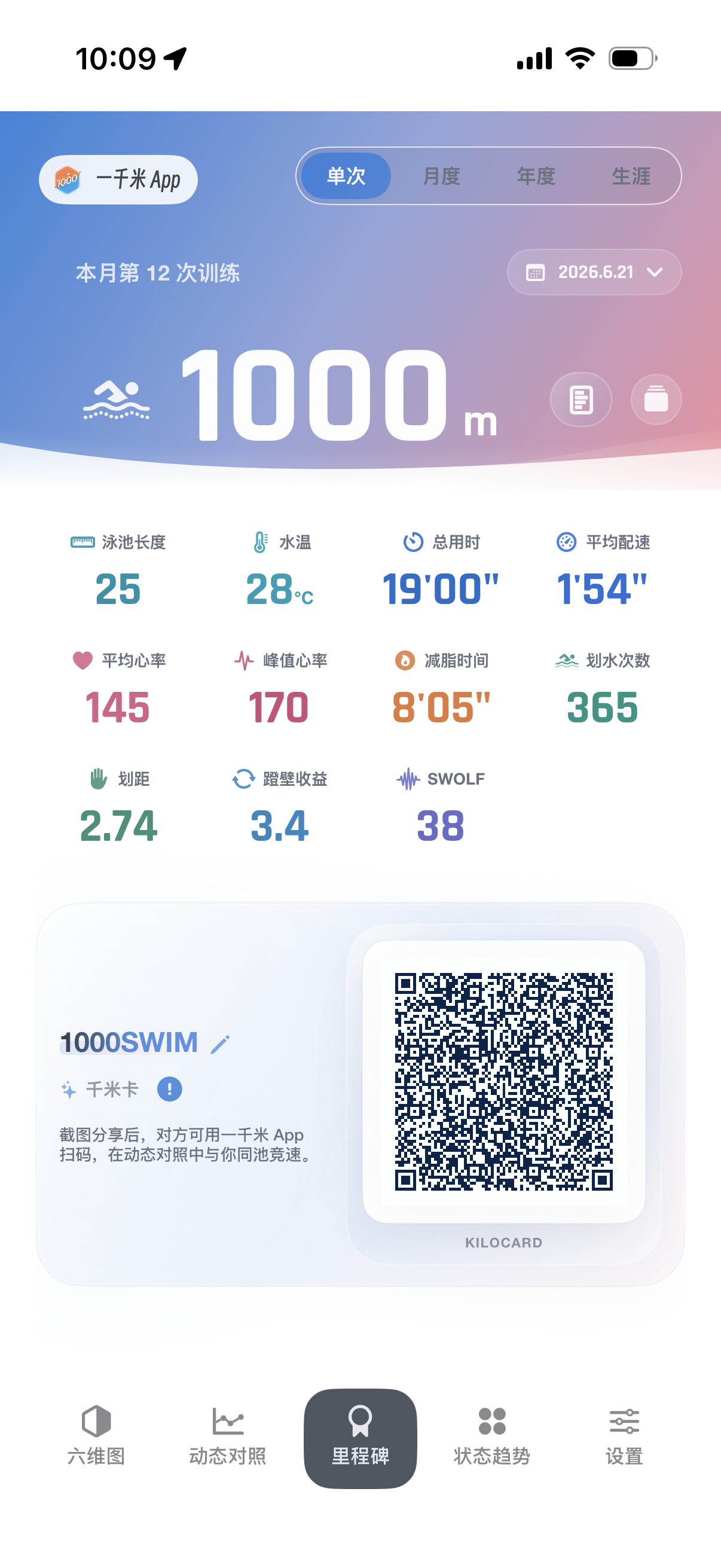
想让坚持本身更有成就感
看里程碑。每天一千米看起来普通,但月度、年度和生涯累计会把长期坚持变成很具体的节点。
- 点哪里:打开里程碑,看月度、年度和生涯进度。
- 看什么:今年游了多少、哪个月最稳定、下一段距离还差多少。
- 解决什么:让重复训练不只是重复,而是持续积累。
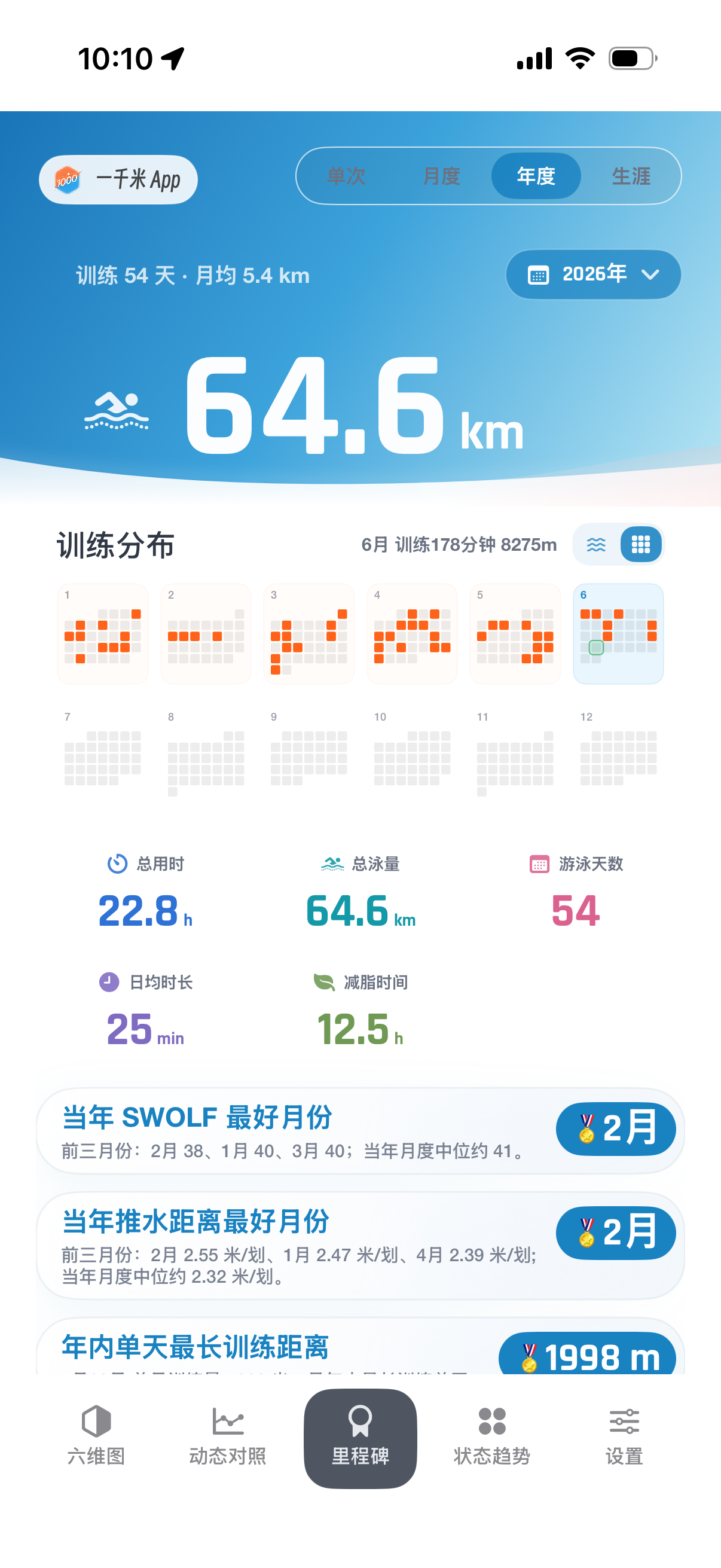
用户常问的问题
如果你已经用 Apple Watch 记录了很多次游泳,最容易卡住的地方通常不是“数据够不够多”,而是这些数据到底说明了什么。下面几组问题,就是一千米主要想回答的事。
看懂一次训练
这次游泳为什么快了,或者为什么慢了?
简单说:一千米不是再记一遍运动记录,而是帮你解释这次 1000 米为什么变快、变慢、变稳,或者为什么突然更吃力。
适合这种情况:已经规律游泳,但不想只盯着总成绩的人。
- 它会看:配速、心率、划频、DPS、SWOLF、池长、分段节奏和相近距离历史。
- 可以这样看:动态对比看两次训练在哪里拉开,状态趋势看长期状态,六维图看速度、效率和负荷有没有一起变化。
- 看完能判断:不只是“快了几分钟”,而是这几分钟大概来自哪一段、哪种能力、哪种状态。
差距是前程、后程、效率,还是训练负荷造成的?
简单说:总时间只能告诉你结果,不能告诉你原因。有时是前半程冲太快,有时是后半程掉了,也可能是划距变长,或者心率负荷上来了。
适合这种情况:想知道自己到底哪里强了、哪里掉了的人。
- 它会看:分段配速、心率、划频、DPS、折线关键段和六维结构。
- 可以这样看:先看动态对比里差距在哪一段打开,再用六维图判断速度是来自效率,还是来自更高负荷。
- 看完能判断:“今天游得顺”或“今天很累”会变成更具体的复盘结论。
把旧记录用起来
Apple Watch 里已有的游泳记录,怎么变成真正的训练复盘?
简单说:你不用重新记账。一千米读取你授权的 Apple 健康游泳记录,把分散的单次训练整理成可以比较、可以解释的复盘。
适合这种情况:已经用 Apple Watch 游了很久,但总觉得健康 App 只是把记录存起来的人。
- 它会看:距离、时长、配速、心率、划水次数、池长、分段节奏和长期历史。
- 可以这样看:系统会围绕相近距离和同池条件组织记录,再放进动态对比、状态趋势、六维图和里程碑里。
- 看完能判断:一堆单次记录会慢慢连成训练路线,而不是只剩一个个运动摘要。
重复游很多次 1000 米,怎样看出长期变化?
简单说:重复训练的价值不一定是每次都刷新成绩。很多变化,是过几个月回头看才看得出来。
适合这种情况:长期固定游 1000 米或相近距离,想知道几年训练到底改变了什么的人。
- 它会看:同距离历史、月度和年度累计、配速趋势、心率趋势、DPS 趋势和里程碑。
- 可以这样看:状态趋势看阶段波动,里程碑看训练量,动态对比用来挑关键年份或关键阶段。
- 看完能判断:你会看到那些重复的一千米,最后是怎么把你带到现在这个状态的。
数据不完美时怎么办
游泳数据有休息、池长或同步问题,还能做可信分析吗?
简单说:可以看,但不能把每条原始记录都当成同样可靠。一千米会尽量保留训练可见,同时用质量判断和置信度控制结论的力度。
适合这种情况:Apple Watch 或 Apple 健康用户,尤其是遇到池长不准、休息太多、第三方同步字段不完整的人。
- 它会看:池长、分段、划水、心率、非连续游、长休息证据和手动修正状态。
- 可以这样看:低置信样本不会直接消失,但会影响它能不能参与统计、能不能作为基线。
- 看完能判断:这次训练还在不在、能不能复盘、能不能参考,以及哪里需要谨慎。
一次复盘怎样变成值得保存或分享的成果?
简单说:训练复盘不该只停在一堆图表上。你应该能回头看,也能把某次有意义的训练分享出去。
适合这种情况:想把长期训练留下来,或者想把一次代表性的 1000 米发给朋友对照的人。
- 它会看:单次亮点、月度和年度累计、历史对比、六维结构、KiloCard 对照信息。
- 可以这样看:里程碑看长期积累,六维图看训练结构,KiloCard 把一次训练变成可分享、可对照的记录。
- 看完能判断:这段时间不是白练了。你能看到,也能把它留下来。
一千米是不是学游泳 App?
简单说:不是。一千米面向已经在游、已经有训练记录的人。它更像复盘工具,不是入门动作课。
适合这种情况:规律长游者、Apple Watch 游泳用户、1000 米重复训练者和游泳爱好者。
- 它会看:已有游泳记录、相近距离对比、池长、配速、心率、划水和长期里程。
- 可以这样看:把现有训练转成动态对比、状态趋势、六维图、里程碑和 KiloCard。
- 看完能判断:你得到的是一面长期训练镜子,不是初学课程表。
真实游泳数据里,1000swim 具体处理什么
真实训练很少像表格一样整齐。距离可能差一点,池长可能有小数误差,中途可能休息,折线也不一定一眼能看懂。下面这些细节,就是一千米为了让复盘更可靠而做的处理。
比较前,先把可比性处理好
不是刚好 1000 米,也能拿来比较吗?
先看结论:可以。一千米的核心是 1000 米训练复盘,但不会因为某次训练是 950 米、1050 米或相近距离,就让有价值的记录失去意义。
它做了什么:系统会围绕相近距离组织记录,优先让训练目标接近的游泳进入对照,而不是机械要求每次距离完全一样。
- 为什么要这样处理:真实训练经常不是整整 1000 米,如果系统只认完全相同距离,很多有参考价值的训练会被迫变成孤立记录。
- 你可以判断:这两次游泳是否属于同一类训练;成绩变化主要是状态和能力变化,还是只是距离不同造成的错觉。
25 米池、25.0001 米这种细小误差,会不会把同一个泳池拆开?
先看结论:不会把这种细小记录误差当成完全不同的泳池。一千米会把池长作为同池对比的重要条件,但也会处理现实数据里的小数误差。
它做了什么:同池判断不会只看字符串是否一模一样,而是围绕有效池长和合理容差判断训练环境是否可比。
- 为什么要这样处理:同一个 25 米池可能被不同同步路径记成 25、25.0 或 25.0001,直接硬匹配会把同一批训练拆散。
- 你可以判断:哪些记录可以放在同一个泳池背景下比较,避免趋势、同池模拟和个人最佳被小数误差打乱。
池长或距离记录错了,能不能修?
先看结论:可以做分析层面的修正。一千米不会改写你的 Apple 健康原始数据,而是在本地分析时应用你确认过的修正结果。
它做了什么:修正前会让你看到池长、距离、配速、SWOLF 和分段数量等变化,确认后再用于复盘、趋势和里程碑等分析。
- 为什么要这样处理:池长或距离一旦记错,配速、SWOLF、划距和分段都会跟着偏,直接拿来比较会误导你对状态的判断。
- 你可以判断:修正前后指标差了多少,这次训练是否可以重新纳入复盘、趋势和里程碑,而不是被记录错误浪费掉。
数据不完美,也要讲清楚边界
中途休息、停表或长时间靠边,会不会导致数据消失?
先看结论:不会简单把训练“删掉”。一千米会尽量保留训练可见,但会区分这条记录适不适合当高置信基线。
它做了什么:训练可以继续用于查看、复盘和累计里程;如果休息或非连续证据影响统计可信度,它会改变参与分析的方式,而不是让用户误以为数据丢了。
- 为什么要这样处理:一场训练可能确实完成了距离,但中途休息太多时,它又不适合当作纯粹的速度或耐力基线。
- 你可以判断:这次训练还能不能查看、能不能计入里程、能不能做复盘,以及是否适合参与高置信对比。
为什么累计里程能看全量,而直接对比会更谨慎?
先看结论:因为“训练量”和“高质量对比”不是同一件事。一次游泳可以真实贡献你的年度里程,但未必适合作为速度或状态基线。
它做了什么:月度、年度、生涯累计尽量反映完整训练量;直接选择和对比会更关注距离、池长、质量和会员范围,避免把不可比记录硬放在一起。
- 为什么要这样处理:很多系统把“我今年到底游了多少”和“哪两次训练能严肃对比”混在一起,结果要么漏算坚持,要么污染分析。
- 你可以判断:训练量看全量,状态对比看可比样本;你既能看到真实累计,也能避免拿不适合的记录下结论。
把图表变成能行动的判断
折线图不是只画曲线,怎么帮我找到关键段?
先看结论:一千米的折线图不是只把数据画出来,而是尽量把节奏变化、差距打开、效率变化和疲劳信号放到同一个阅读语境里。
它做了什么:围绕配速、心率、划频、DPS、SWOLF 和蹬壁收益等指标提取关键变化,让用户知道该看哪一段,而不是面对多条线自己猜。
- 为什么要这样处理:多条折线放在一起很容易变成“看起来很专业,但不知道该看哪里”。用户需要的是关键段,而不是更多曲线。
- 你可以判断:差距是在前半程拉开、后半程崩掉,还是来自划距、心率负荷、蹬壁收益和动作效率的变化。
状态趋势怎样避免把不可比的数据硬说成进步?
先看结论:状态趋势会更重视同池、相近距离和足够可参考的历史样本,避免只因为某一天数据好看就过度下结论。
它做了什么:趋势卡片会结合配速、心率、DPS、池长和样本质量;历史基础偏弱时,表达会更谨慎,不把偶然波动包装成稳定进步。
- 为什么要这样处理:单次成绩好看不代表真正突破,单次成绩难看也不代表退步;趋势如果乱混样本,很容易制造假结论。
- 你可以判断:当前阶段是在适应、变稳、疲劳、突破,还是只是样本不足导致的波动。
六维图为什么不是单纯好看的图?
先看结论:六维图的价值是把一次训练拆成结构,而不是把所有指标堆成表格。
它做了什么:它把速度、耐力、效率、稳定、负荷和动作相关信号放进同一张图里,让“快”背后的原因更容易被看见。
- 为什么要这样处理:只看总时间会把所有能力压成一个数字,用户不知道这次好是因为游得更省、更稳,还是只是更拼。
- 你可以判断:这次训练的强项和短板分别在哪里,速度提升背后更像效率提升、负荷提高,还是整体稳定性变好。
分享时,保留价值也保留边界
千米卡为什么能分享,又不等于暴露完整健康数据?
先看结论:千米卡是用于对照和回放的轻量训练卡,不是完整健康数据导出。
它做了什么:卡片只保留动态对照需要的粗略训练信息,不包含完整 HealthKit 明细、原始样本、健康数据标识、GPS 或账户数据。
- 为什么要这样处理:用户想分享一次有意义的训练,但不想把完整健康数据、原始样本或身份相关信息一起发出去。
- 你可以判断:这张卡能不能作为一次对照参考,同时分享出去的只是用于回放和比较的必要信息。
有休息段的千米卡,还能做同池回放吗?
先看结论:能尽量保留真实训练节奏,而不是因为某一段太慢或靠边休息就直接失败。
它做了什么:千米卡会把游进节奏和休息信息分开处理,再在同池回放里重建总节奏,让停在池边的状态也能被表达出来。
- 为什么要这样处理:真实训练里会有靠边休息或间歇,如果把休息直接当成异常,很多长训和间歇训练就无法被分享或回放。
- 你可以判断:同池模拟里能看到游进和停顿的节奏差异,知道差距来自游速本身,还是来自休息和节奏安排。
多语言答案摘要
繁體中文:1000swim 適合誰?
1000swim 適合已經規律游泳、使用 Apple Watch 或 Apple 健康累積訓練資料的使用者。它不是學游泳 App,而是幫你比較 1000 米或相近距離訓練,理解自己在哪裡變快、變穩、變有效率。
日本語:1000swim は誰向けですか?
1000swim は、すでに定期的に泳ぎ、Apple Watch のスイム記録を振り返りたい人向けです。泳ぎ方を学ぶアプリではなく、1000m前後の泳ぎを比較し、ペース、心拍、DPS、長期的な変化から進歩を読み取るための分析アプリです。
한국어: 1000swim은 누구에게 맞나요?
1000swim은 이미 꾸준히 수영하고 Apple Watch 기록을 쌓아 온 사용자에게 맞습니다. 수영을 처음 배우는 앱이 아니라, 1000m 전후의 수영 기록을 비교하고 페이스, 심박, DPS, 장기 추세로 실제 진전이 어디에서 생겼는지 보여주는 분석 앱입니다.
Español: ¿Para quién es 1000swim?
1000swim es para nadadores que ya entrenan con regularidad y guardan sus sesiones con Apple Watch o Apple Health. No es una app para aprender a nadar; sirve para comparar nados de 1000 m o distancias similares y entender el progreso con ritmo, frecuencia cardiaca, DPS y tendencias.
数据来源与限制
一千米读取 Apple 健康中用户授权开放的游泳训练数据,并基于这些数据进行本地分析。Apple Watch 记录越完整,动态对比、划频、划距、SWOLF 和状态趋势越能发挥作用。
如果第三方设备没有把泳池长度、划水次数、心率或分段数据完整同步到 Apple 健康,部分分析可能只能提供有限参考。这是源数据字段限制,不代表原始训练记录丢失。
隐私与本地处理
训练分析以本地处理为主。KiloCard 仅包含用于动态对照的粗略训练信息,不等同于完整 HealthKit 明细。你也可以随时通过系统授权控制应用对健康数据的访问。
如果你遇到健康权限、订阅、恢复购买或训练记录不显示的问题,请查看一千米技术支持页。
适合规律长游、1000 米训练复盘、阶段对比和希望看清自己变化的游泳用户。